
Local business guide
Business Not Showing Up on Google Maps? 7 Checks to Make
Business missing from Google Maps? Check verification, profile status, business details and local visibility, then choose the right next step for your business.
Quick answer
Start by separating two problems: a business that cannot be found by its name, and a business that appears by name but does not rank for a service search. The first needs a profile-status and accuracy check. The second needs a local visibility review. Before changing anything, search your exact business name and city, open the profile while signed in to its managing account, and record what customers and owners actually see.
A simple way to approach it
- 01
Search your exact business name and city, then compare it with a service search such as 'AC repair near me'.
- 02
Open the managing Google account and check whether the profile is verified, pending, suspended or otherwise restricted.
- 03
Check eligibility, address or service-area settings, primary category, phone, hours and website against your real business.
- 04
Check for an existing duplicate or a profile managed by another account before creating a new listing.
- 05
Review how clearly your website explains your services and real service areas, and whether customers can contact you on a phone.
- 06
Choose the matching next step: verification, an official support/appeal route, an accuracy correction or a broader local visibility review.
1. Check whether the profile is missing or simply ranking lower
Try the exact business name with the city first. Then try the main service near a real customer location. Write down the search, device and location: results can vary, so one search is not a reliable ranking report. A profile can be available to customers without appearing in the first few results for a competitive phrase.
Illustrative US example: an HVAC business in Austin may appear for its business name but not for 'AC repair near me' when a customer searches from another neighborhood. That does not prove the profile is broken. Check whether the listing is accurate and the search area is realistically served before changing its name or address.
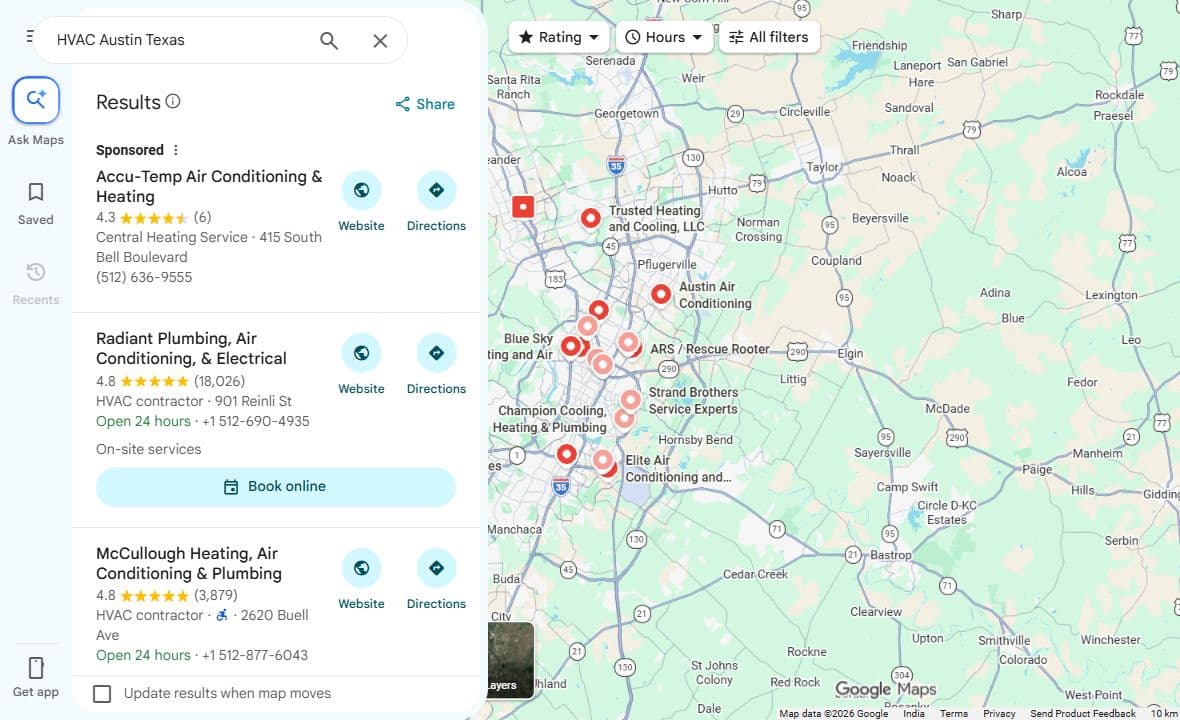
In the real search screenshot below, a broad service query shows multiple businesses across the Austin area. The result marked 'Sponsored' is an advertisement. Compare this kind of service search with an exact business-name lookup; neither screenshot proves a fixed ranking for every customer.
2. Read the verification and profile-status messages
Sign in to the Google account used to manage the business and read the current status. Follow the verification method Google offers to that business; do not assume every business can choose a postcard, phone call or video. If verification is pending, follow the instructions in the account instead of repeatedly changing business details.
If the profile is suspended or disabled, use Google's official guidance and appeal process. An audit of public data cannot see every private account issue or lift a suspension. Keep legitimate evidence of the business ready and avoid paying someone who promises an instant reinstatement.
3. Confirm that the business and location meet the guidelines
A storefront and a business that visits customers have different address needs. A plumber working from home should review the rules for service-area businesses; a public home address is not a shortcut to better visibility. Check Google's current guidelines against how the business actually operates.
Use the real business name and accurate location details. Do not invent an office or add a string of services and cities to the name. If something is unclear, resolve eligibility first so later marketing work supports a compliant listing.
4. Correct details that could confuse customers
Check the primary category, phone number, website, opening hours and service area. Choose a category that describes the main business rather than every task it occasionally performs. Review holiday hours and confirm that the website link reaches a working page.
Compare these details with the business website and important existing listings. For example, an old phone number or a moved address can make a real business look inconsistent. Keep a record of corrections rather than changing several unrelated settings every day.
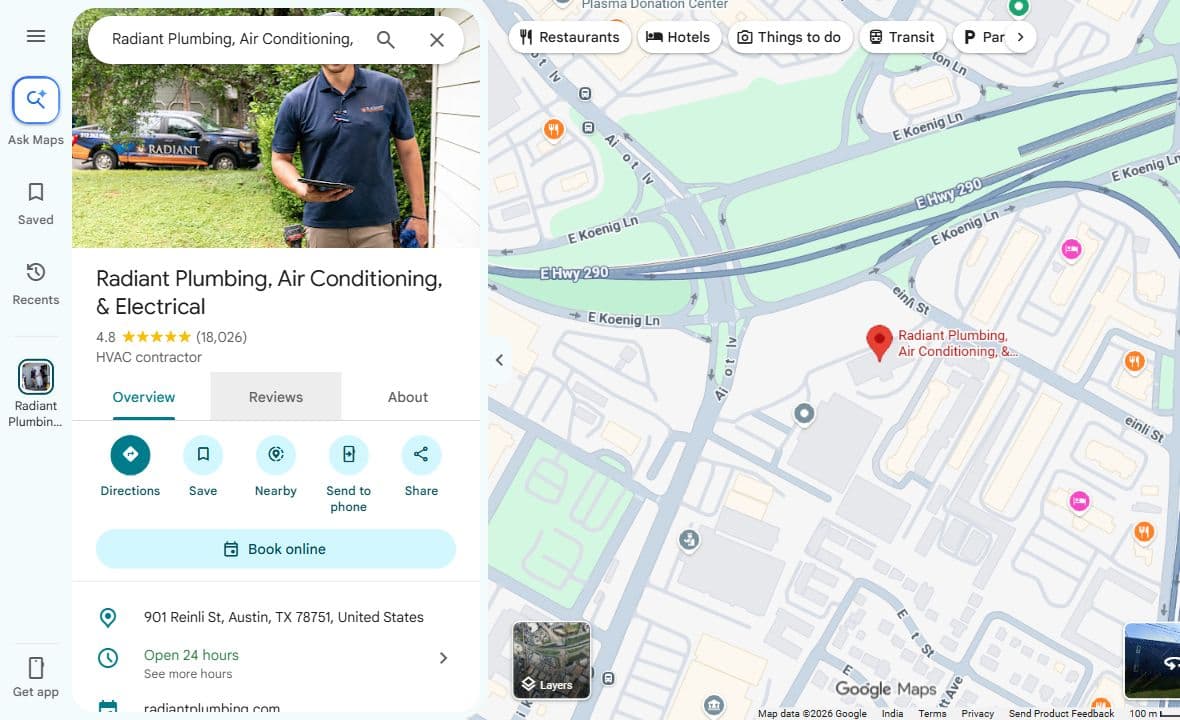
The public profile below shows where a customer can read the category, address and opening hours. It is a real interface example, not an endorsement or a claim that XpertManager manages this business. Private verification and suspension messages must be checked in the owner's account.
5. Look for duplicates and ownership confusion
Search for the business's current and former names or addresses. A previous employee, agency or owner may have created the original profile. Check who has access before creating another listing for the same business.
When another person controls the profile, use the official ownership request route. If you suspect a duplicate, review Google's help and establish which listing represents the real business. Do not delete a working listing with customer reviews merely to start again.
6. Review relevance, distance and prominence
Google describes local results in terms of relevance, distance and prominence. These are not switches that an agency can turn on. An accurate listing, clear service information and honest customer feedback can support a useful local presence, while a customer's distance from the business remains part of the search context.
Your website should help a customer understand the service, real coverage area, credentials where applicable and how to request help. Create location content only when it offers information specific to that area. Ask customers for honest reviews consistently; do not buy reviews, offer rewards for them or request feedback only from happy customers.
7. Test the journey from discovery to an inquiry
Open the public profile and linked website on a phone. Check that a visitor can find the correct phone number, service details and contact route. A listing that earns attention still needs a working path to a call, quote or booking.
Use the free XpertManager Local Growth Audit below as an initial review of available public business information, a small nearby comparison set and website readiness. The saved report can help you choose priorities. It does not measure your Maps ranking, access private Business Profile settings, predict lost customers or guarantee visibility.
What to record before asking for help
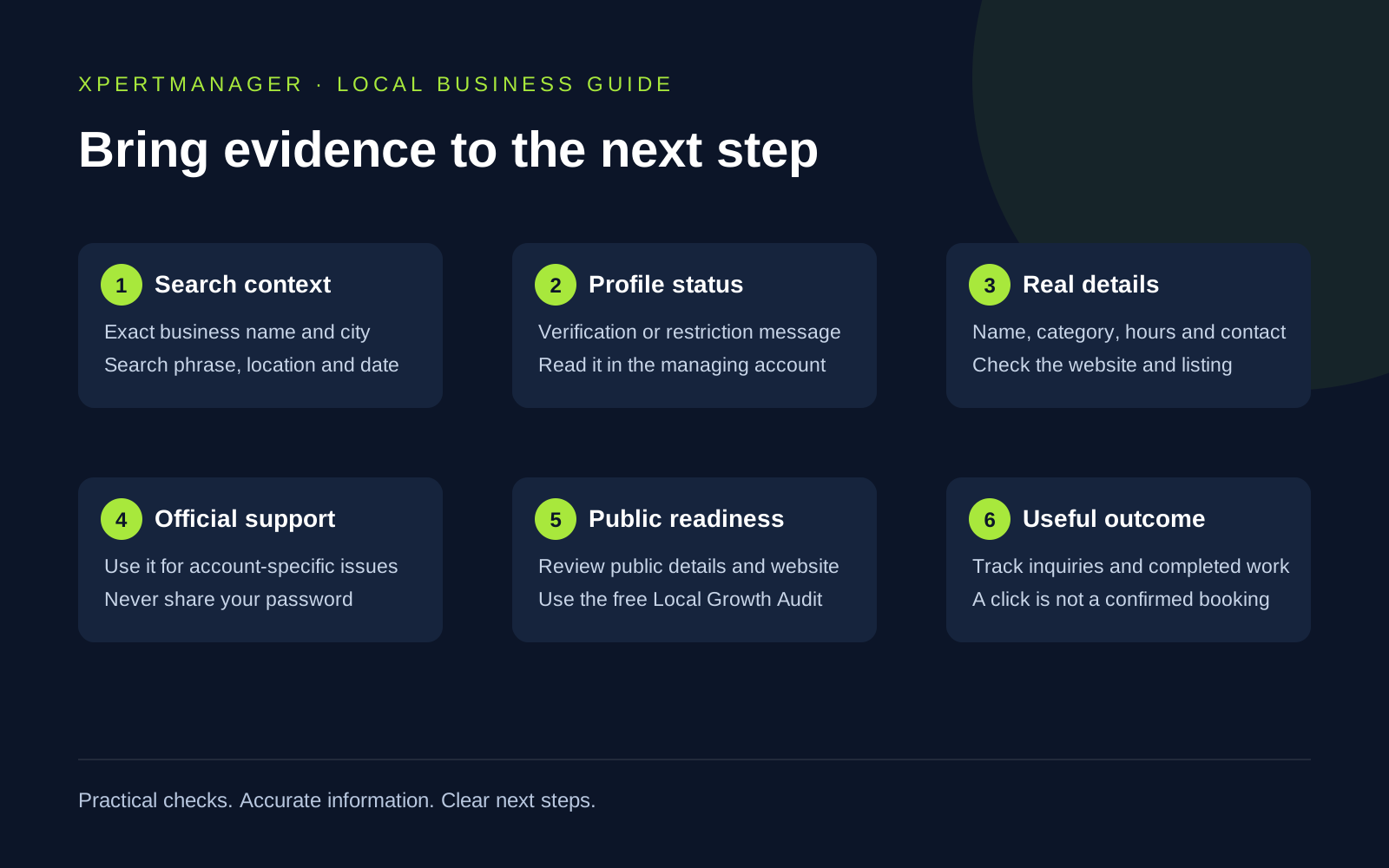
Prepare the business name and city, public profile link if available, the exact search that failed, the date, any recent business changes and the status message shown to the owner. Keep account credentials and private verification documents out of public forms. Send documents only through the official channel when requested.
Track the outcome you actually need. Profile visibility, search clicks, phone-link taps and completed inquiries are different measures. If a local SEO provider helps, ask what evidence will be checked, what changes are proposed and how progress will be reviewed. Treat a guaranteed number-one ranking as a reason to ask more questions.
Good to know
- Google chooses verification methods and controls review, appeal and ranking outcomes. Check current account instructions rather than relying on a fixed timeline.
- Public search results vary by searcher location and other context. One screenshot does not establish the business's rank everywhere.
- This guide is written for local business owners and providers, with an illustrative US home-service example. It does not claim XpertManager has an office in that city.
Common questions
Questions people ask
Why can I find my business by name but not by service?
The listing may be available but less visible for that service and search location. Check category, service information, website clarity and the local context. This is different from a suspended or missing profile.
Should I create another Google Business Profile?
Check for an existing profile and ownership first. Creating a duplicate can make the issue harder to resolve. Follow Google's official ownership or duplicate-profile guidance.
Can a free audit fix a suspended profile?
No. The Local Growth Audit reviews available public information and website readiness. Suspension and verification issues need the managing account and Google's official support or appeal process.
Will adding more service areas guarantee better rankings?
No. Keep service areas accurate. They are not a way to override Google's local ranking systems or guarantee visibility throughout a city.
Can an agency guarantee a top Google Maps position?
No provider controls Google's results. Ask for a clear scope, evidence-backed improvements and honest reporting instead of a ranking guarantee.