Local business troubleshooting
Google Reviews Not Showing Up? What to Check First
Google review missing or delayed? Check the right profile, recent changes and official guidance, then prepare a clear support record without risky shortcuts.
Quick answer
First establish what is missing: one new review, several older reviews, the public review list or only your owner dashboard. Check the correct business profile and record what you can actually see. A missing review is not enough evidence to diagnose a penalty, and changing your business name or creating another profile is not a sensible first response.
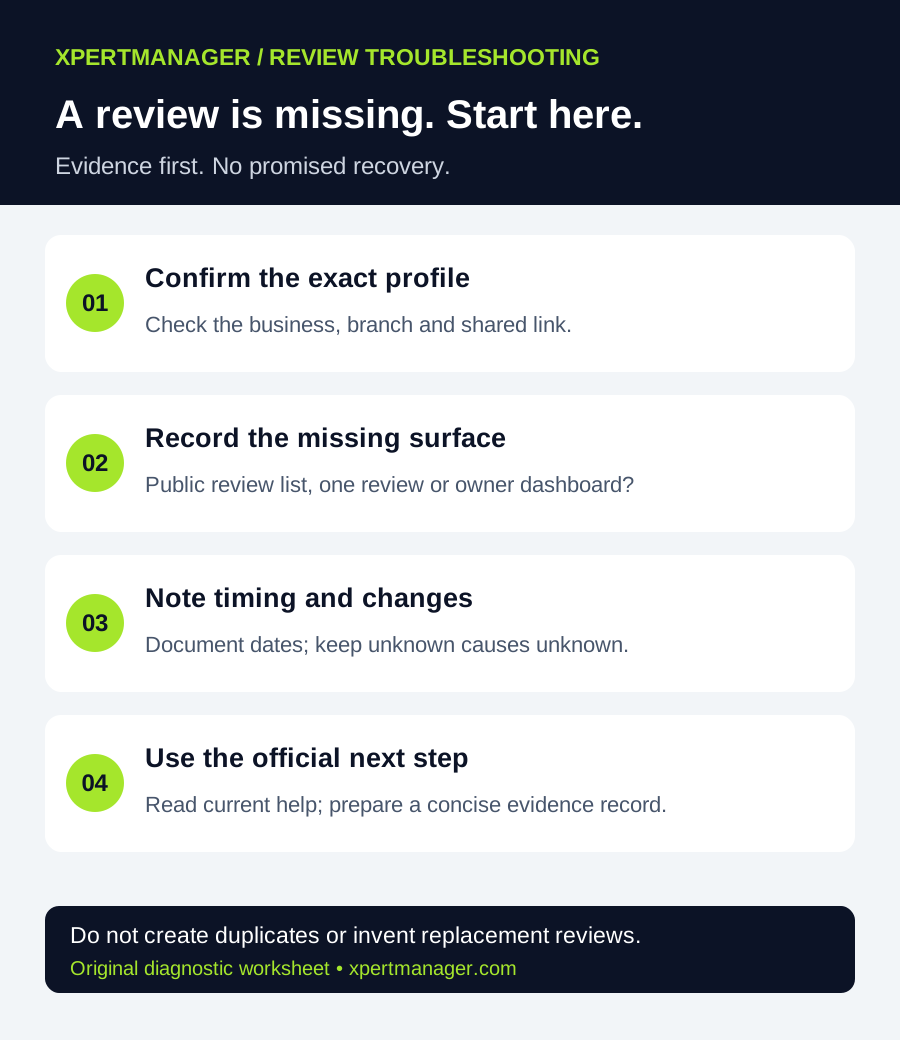
A simple way to approach it
- 01
Confirm the exact business and branch.
- 02
Compare the public listing with the owner view.
- 03
Record timing and recent profile changes.
- 04
Read the current official guidance for the matching situation.
- 05
Choose one evidence-backed next step and document the outcome.
Start with a short evidence record
Write down the business name, public profile link, branch, date checked and the precise symptom. Separate what you observed from what somebody reported. For example: “A customer says they submitted feedback on Monday; I cannot find it on this branch's public profile on Wednesday.” That is more useful than “Google deleted every review,” unless you have evidence for that claim.
For an agency, keep one record per business and restrict access to people handling the issue. Redact private customer details from screenshots used in shared reports. Do not ask customers for account passwords, sign-in codes or access to their personal Google accounts.
1. Confirm the business and branch
Open the profile link you already share with customers. Check the business name, location and contact details. If there are similar names or multiple branches, establish which destination the customer used before assuming feedback disappeared.
Record any suspected duplicate without deleting or merging profiles yourself. Those actions can affect an existing listing and its history. A local SEO provider should explain the evidence and proposed next step before making consequential changes.
2. Compare what customers and owners can see
Look at the public profile in Search or Maps and compare it with the managing account. Record the surface and device you checked. A difference between two views is an observation, not a confirmed platform-wide outage.
If public reviews are present but an owner screen appears empty, capture that distinction in your support record. Avoid describing all reviews as publicly removed when you only checked the dashboard. Conversely, an email notification alone does not establish that a review remains publicly visible today.
3. Check timing and recent changes
Google says review checks can delay appearance for a few days, and merged profiles can take time to display their reviews. Older phones or software can also cause submission difficulties. Its guidance notes that user-created content may sometimes be temporarily disabled and that reviews removed for policy violations are not restored. After reinstatement-related review loss, Google directs businesses to support.
These are possible situations, not a diagnosis of your business. Record a known merge or reinstatement date if applicable. Do not manufacture an exact recovery deadline, repeatedly resubmit the same feedback or ask customers to post from several accounts.
If your business falls into a category with special review rules, read the relevant section of Google's current help page. Do not change an accurate category solely to get around a restriction.
4. Keep the review process honest
Review your own invitation process separately from investigating the missing item. Were invitations optional and neutral? Were customers able to share honest feedback without receiving a discount or being told what rating to give?
Our Google review request templates explain a neutral process. They are not a method for making a removed review reappear. Do not ask an agency to rewrite customer reviews, invent replacement feedback or guarantee restoration.
If a customer wants to check their own submission, let them do so in their own account. Keep any request brief and voluntary. The business should not take control of a customer's account or write a review on their behalf.
5. Prepare a clear support request when appropriate
Start from Google's missing or delayed reviews guidance and use the official support option linked there when it fits your situation. Available support routes and account prompts can change; follow the current instructions shown for the managing account.
A concise preparation note can look like this:
Business: [real business and branch] | Public profile: [profile link] | Symptom: [one review / several reviews / dashboard discrepancy] | First observed: [date and time zone] | Known recent changes: [none known / dated merge or reinstatement] | Checks completed: [surfaces, dates and findings] | Request: Please advise on the appropriate next step for this observed issue.
This is an original evidence template, not a Google form or a guarantee that support will restore a review. Supply further information only through the appropriate official route and avoid including unrelated private records.
Example: an auto repair shop with two locations
Imagine a shop operating two real locations in Texas. A customer says their review is missing. The office first checks which branch link was sent, compares both public listings and records the finding. This is an illustrative workflow, not a client case study or a claim about actual review recovery.
If the link pointed to the wrong branch, correcting future invitations is a concrete process improvement. It still does not authorize copying somebody's review to another listing. If the correct destination was used, the office continues with the dated evidence record and official guidance.
What a local SEO provider should deliver
Ask for a dated summary with three columns: observed, unknown and next action. “Not found during our check” belongs in observed. “Removed by spam detection” belongs in unknown unless the relevant platform evidence establishes it. Assign an owner and a follow-up date, and record whether the public situation changes.
For wider business readiness, use our local SEO audit checklist or the free Local Growth Audit. The audit reviews available public information and website readiness. It does not access private profile settings, recover missing reviews or submit review appeals. Local SEO support should preserve the same distinction between observation and proposed work.
Good to know
- A missing item alone does not establish a penalty or platform-wide incident.
- Do not create duplicate profiles, invent replacement reviews or promise recovery.
- Google controls review moderation and support outcomes.
Common questions
Questions people ask
How long should a review take to appear?
Google describes possible delays, not a guaranteed publication deadline. Use its current guidance and record dates rather than promising a fixed waiting period.
Should I create another Business Profile?
Not as a missing-review troubleshooting shortcut. First establish the correct existing profile and the actual symptom; unnecessary duplicates create another issue to investigate.
Can XpertManager restore a review?
No restoration capability is offered by the Local Growth Audit. Google controls review moderation and the available support outcomes.
Does a missing review prove that my business is penalized?
No. The observation alone does not identify a cause. Record evidence and distinguish a missing item from an entire profile or dashboard problem.